Passkeys are designed to replace passwords with something that’s both easier to use and harder for attackers to steal.
1. A Short History
The idea behind passkeys comes from the FIDO Alliance, an industry organization created in 2012 to reduce our dependence on passwords.
In 2019, WebAuthn became an official web standard developed by the W3C and FIDO Alliance. This made passwordless authentication possible directly through modern browsers and devices.
Then, in 2022, Apple, Google, and Microsoft announced broader support for passkeys across their platforms.
Today, passkeys are supported by major operating systems, browsers, password managers, and many websites.
2. How Do Passkeys Work?
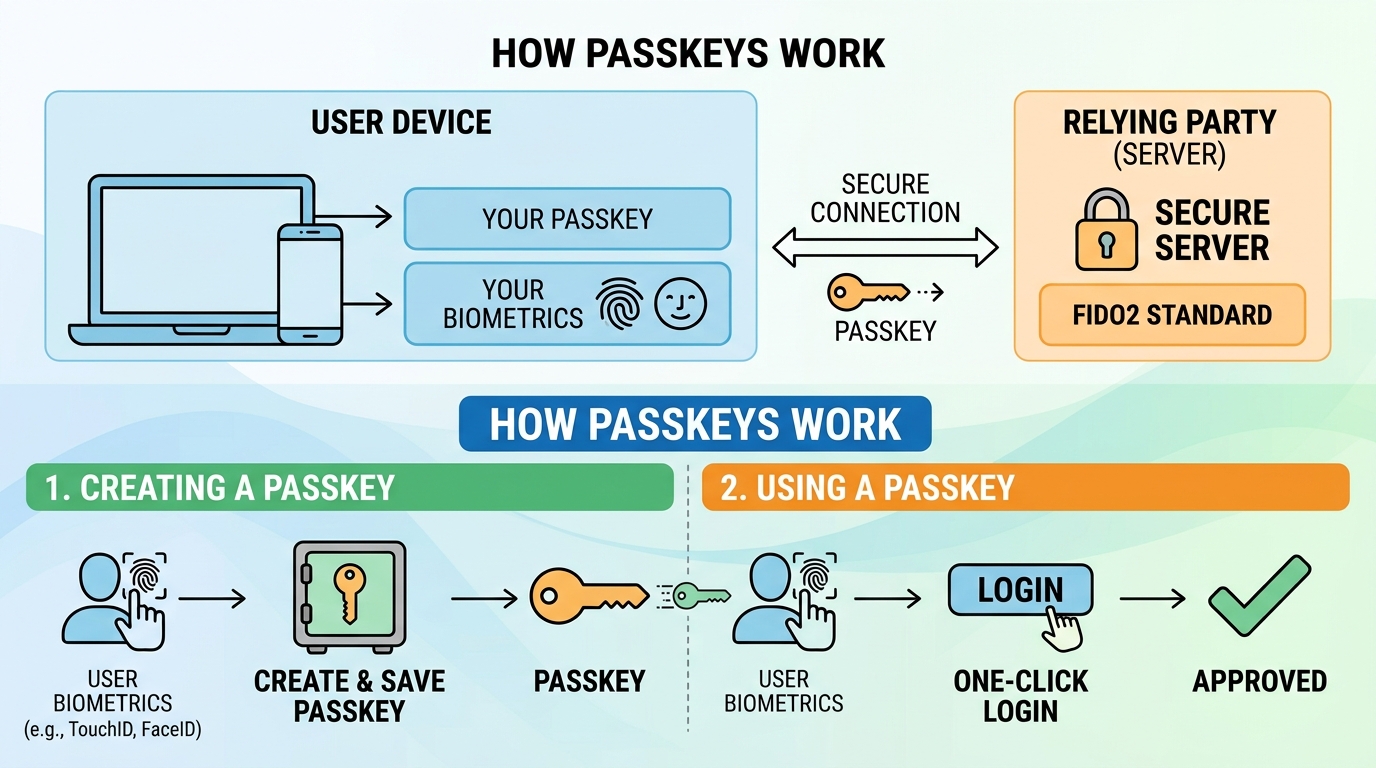
The easiest way to understand a passkey is:
You don’t give the website your password. Your device proves that you are you.
When you create a passkey, your device creates a pair of digital keys:
- Private key → stays on your device or passkey provider.
- Public key → is registered with the website.
When you log in, the website sends your device a challenge. Your device uses the private key to prove that you have the correct credential.
You normally approve the login using:
- Face ID or another face scan
- Fingerprint
- PIN
- password
Your biometric information itself isn’t sent to the website.
For example:
Traditional password:
Website → "What's your password?" → You type "MyPassword123"
Passkey:
Website → "Prove it's you" → Phone verifies you → Login
Much less typing. Much less opportunity to accidentally hand a password to a bad guy.
3. Why Are Passkeys More Secure?
One of the biggest advantages of passkeys is that they are phishing-resistant.
Imagine you receive a fake email from your bank and click a fake login page. With a password, you might type your username and password into the fake website. The attacker now has your credentials.With a passkey, the credential is cryptographically tied to the real website’s domain. A fake website can’t simply ask your device to use the passkey belonging to the real bank website.
Passkeys can also help protect against typosquatting.
Typosquatting happens when attackers create a fake website using a domain that looks similar to the real one.
For example:
paypa1.com ← fake
micros0ft.com ← fake
You might accidentally type the wrong address and end up on the attacker’s website. With a traditional password, you could unknowingly type your password into the fake website. With a passkey, the credential is associated with the legitimate website’s domain. The fake domain cannot normally use the passkey registered for the real domain.
So passkeys don’t stop you from visiting a typosquatting website, but they can stop the attacker from using that website to steal your passkey credentials.
4. What Supports Passkeys?
Operating systems and built-in providers:
- Apple — iCloud Keychain
- Google — Google Password Manager
- Microsoft — Windows Hello / Microsoft Password Manager
For people who need particularly strong protection, physical FIDO security keys such as YubiKey can also store device-bound passkeys.
Summary
Passkeys are basically the next step after passwords. Instead of asking you to remember a secret, your device uses cryptographic technology to prove your identity.
Their biggest security advantages are that they are phishing-resistant, resistant to credential theft through typosquatting, unique to each service, and don’t require websites to store your password.
The basic idea is simple:
With passwords, you prove your identity by telling the website a secret. With passkeys, your device proves your identity without revealing that secret.